
A cash counter that posts through the same books
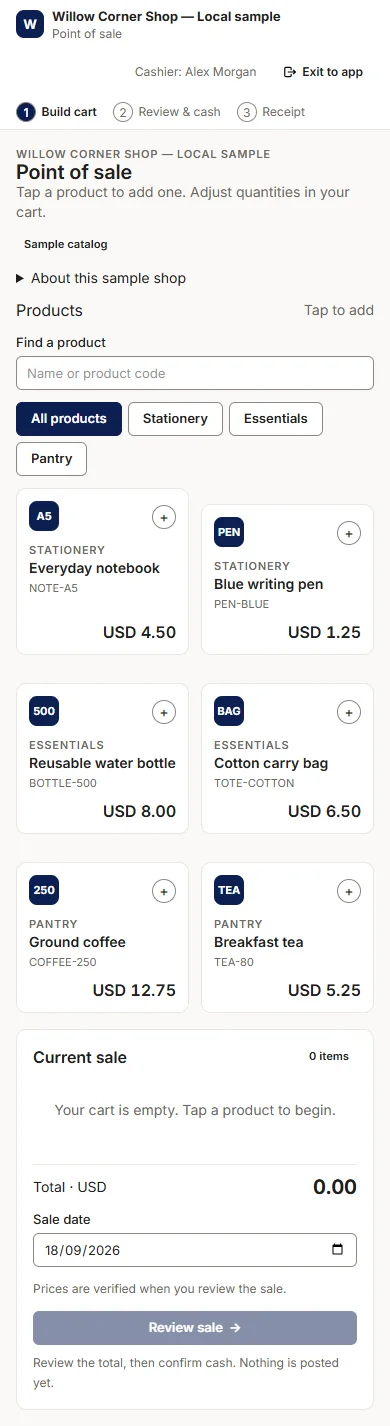
PHP Ledger's optional cash point of sale builds a cart, reviews cash and change, and prints a receipt. A confirmed sale records one balanced journal through the central posting service, so the day's takings appear in the reports without re-keying. Switch the module on under Modules when a counter needs it.
Screens show a fictional sample business, Willow Corner Shop, in version 1.4.7.
Three steps at the counter
The screen stays on one page: products on the left, the current sale on the right. A sale date is set before review, and the total is verified again when you confirm, so a slow connection cannot post a stale cart.
Build the cart
Tap a product to add it, search or filter the catalogue by category, and adjust quantities in the cart. Prices come from the product register, so the counter never types a price by hand.
Review and cash
Check the total and the sale date, enter the cash received and see the change. Nothing is posted until you confirm, and the review step is where a wrong quantity is caught.
Receipt
Print the receipt for the customer. The confirmed sale posts one balanced journal through the central posting service, the same path every invoice and expense takes.
What it records
A confirmed sale in PHP Ledger posts one journal: debit cash, credit sales. The entry goes through the same central posting service as every other document, so the books stay balanced and the sale appears in the account statements, the profit and loss and the cash position immediately.
Confirming the same sale twice returns the same receipt instead of posting twice, and a reversal of a counter sale is a linked entry with its reason recorded, like any other correction.
What it is for
Two situations suit the cash counter: evaluating the posting path with a real till before committing to it, and small counters that take cash only, such as a kiosk, a canteen or a workshop front desk.
Businesses that need stock, tax or card handling at the till keep selling through invoices and receipts, where those workflows are complete. The counter is a convenience over the books, not a second set of them.
What the counter does today, and what it does not
The limits are published rather than implied, and a production shop point of sale was never added; maintenance has stopped for lack of funds.
Today
- A cart with search and category filters, cash and change review, and a printable receipt
- One balanced journal per confirmed sale, posted through the same central service as every document
- Switched on or off per company under Modules
Not yet
- Stock movements and cost of sales at the counter
- Tax at the counter
- Discounts, card payments, credit sales, refunds and tills
- A production shop point of sale; that is a later capability release
Questions about the counter
Does a cash sale update stock?
Not at the counter in version 1.0. The cash point of sale posts one journal, debit cash and credit sales. Stock movements and cost of sales at the counter were never added at the counter; they were recorded through invoices and stock counts instead.
Can I print a receipt?
Yes. Every confirmed sale produces a printable receipt, and confirming the same sale twice returns the same receipt instead of posting twice.
Can I switch the module off?
Yes. The point of sale is a module that a company switches on or off under Setup, Modules. Businesses that sell through invoices only never see it.
Three ways to start
Try it in the browser
Open the shared installer demo. All records and sessions reset every hour.
Try the live demoInstall it on your server
PHP 8.2+, MySQL 8.0.19+ (8.4 recommended) or MariaDB 10.4+ and a browser installer.
Download 1.4.7Get help or a licence
Ask questions, discuss support, or request a commercial licence.
Pricing and licence